Get ready for FNF Mobile action with the complete FNF VS Oruta Mobile Mod—you can play online or download the full port, which includes all songs and difficulties, for your next rhythm battle.
Play FNF VS Oruta Mobile Mod Online

Download FNF VS Oruta Mobile Mod
More FNF Mobile Mods






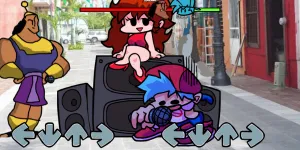

| Feature | Detail |
| Main Opponent | Oruta |
| New Songs | All original songs included |
| Difficulty | All difficulties included; “Bounce” difficulty replaces the base game’s Hard difficulty |
| Engine | V-Slice Mod Folders |
| Platforms | Android/PC Mobile Compatible (V-Slice) |
| Latest Version | Clean1 |
| File Size | vs_oruta_4f3b6.zip |
| Mobile Port Team | FNF Fan (@full.fnf tiktok) |
How to Install FNF VS Oruta on Mobile
Here are the basics to set up this FNF Mobile Mod:
- Tap the download button above to get the
.zip. - Use your phone’s Files app (or ZArchiver on Android) to unzip it into a new folder.
- Move that folder into your FNF Mobile
modsdirectory. - Close and restart the game — the mod should appear.
Need more help? See the full step-by-step install guide.
What is the FNF VS Oruta Mod?
The FNF VS Oruta Mobile Mod is a V-Slice port that brings the full experience against Oruta to FNF Mobile. You can play online or download this version, which features all the original songs and difficulties. Notably, the unique “Bounce” difficulty is fully implemented, taking the place of the standard Hard difficulty, offering a distinct charting experience. If you are new to FNF, the creator suggests playing on Normal difficulty to fully enjoy this high-quality Mobile Mod.
FNF VS Oruta Video Showcase
Mod Credits
- Creator of the Port: FNF Fan (@full.fnf tiktok)